
Download Autosave – backup, file backup, data protection, hard drive backup, file recovery, automatic backup, secure backup, backup utility, backup tool, backup software
Overview
Autosave is a dedicated backup utility designed for Windows users seeking a reliable method to safeguard important files and entire drives. The application addresses the critical need for data protection in both personal and professional environments, offering a straightforward solution to prevent data loss due to hardware failure, accidental deletion, or system crashes. By enabling users to back up individual files, folders, or entire drives, Autosave serves as a practical tool for anyone managing digital content on a Windows-based system.
The target audience includes everyday users, small business owners, and individuals who prioritize data integrity but may lack technical expertise. The application’s user-friendly wizard simplifies the backup process, reducing the learning curve typically associated with data protection tools. While the developer, Autosave Software, is not further detailed in the provided information, the app’s long-standing presence since its release on January 29, 2013, suggests a stable and functional design focused on core utility.
Real-world use cases include backing up financial records, personal photos, project files, and system configurations. In a broader context, Autosave contributes to the Windows utility ecosystem by providing a lightweight, focused alternative to more complex backup platforms. Its emphasis on simplicity and accessibility makes it a suitable choice for users who need a no-frills backup solution without the overhead of advanced features.
Key Features & Functionality
- User-Friendly Wizard: A guided interface walks users through four core actions—backup, restore, settings adjustment, and access to advanced options—ensuring a seamless experience even for non-technical users.
- Flexible Backup Options: Supports both individual file and folder-level backups, allowing users to tailor their protection strategy based on data importance and volume.
- Multiple Storage Destinations: Backups can be saved to CDs, DVDs, USB drives, and ZIP units, providing adaptability across various physical storage media.
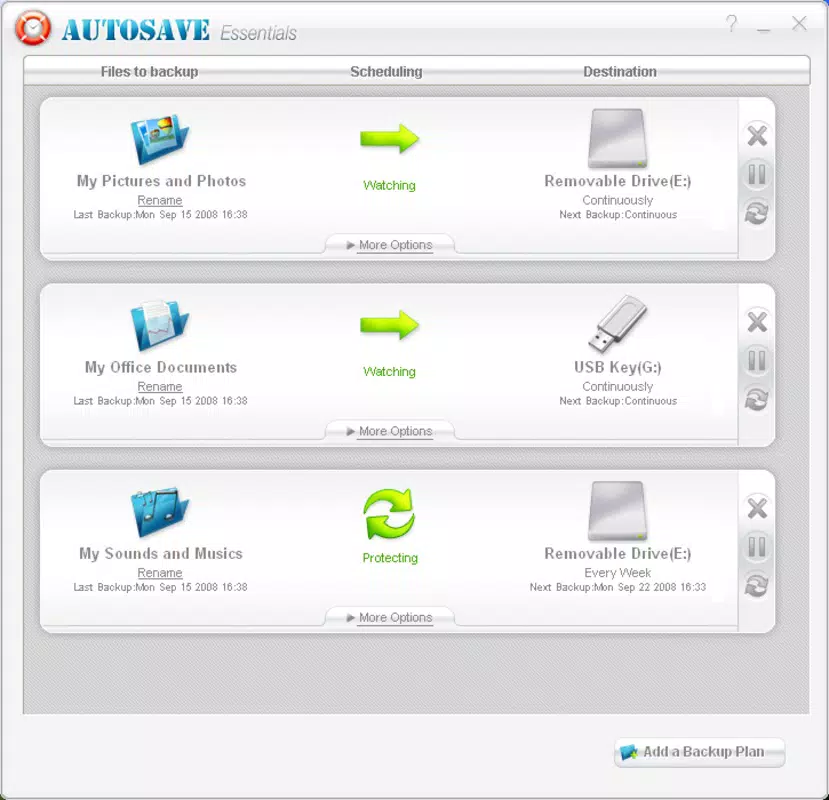
- Advanced Backup Management: Tracks the status of backed-up files, helping users verify completion and identify any failed operations to maintain data integrity.
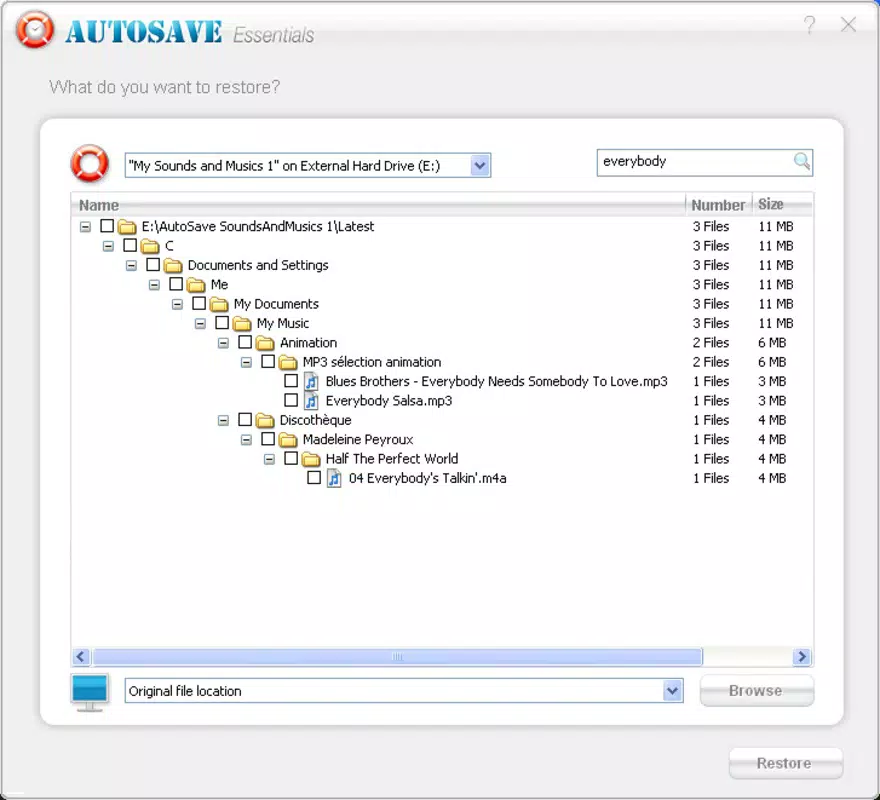
- Restore Functionality: Enables quick and efficient retrieval of previously saved data, which is essential during recovery scenarios and minimizes downtime.
For example, a user preparing for a system upgrade can use Autosave to back up critical documents and settings to a USB drive before proceeding. Similarly, a photographer might use the tool to archive a completed project to a DVD for long-term storage. These practical applications highlight the app’s value in real-world data management workflows.
Interface, UX & Performance
Autosave features a clean, straightforward interface centered around its guided wizard, which streamlines navigation and reduces user confusion. The layout prioritizes clarity, with clearly labeled options and logical progression through backup and restore workflows. Visual design is minimalistic, focusing on functionality over aesthetics, which aligns with its utility-driven purpose.
Navigation is intuitive, with a linear flow that guides users from selection to execution. The absence of cluttered menus or hidden settings supports ease of use, particularly for users unfamiliar with backup software. Although the developer did not list formal performance metrics, the application’s lightweight footprint of 2.5 MB suggests efficient resource usage, which is beneficial on older or low-spec Windows systems.
Responsiveness is expected to be consistent, given the app’s modest size and focus on core functions. Stability is likely maintained through years of use, though no specific information on crashes or errors was provided. The app appears optimized for typical desktop environments, though compatibility with modern Windows versions was not explicitly confirmed.
Platform Compatibility & Technical Requirements
Autosave is designed exclusively for the Windows platform, making it compatible with various Windows operating systems. However, the developer did not specify minimum OS requirements or version compatibility details. The software version is listed as 2.0, and the file size is 2.5 MB, indicating a lightweight installation.
Given its release date in 2013, the app may not support the latest Windows updates or security protocols without potential compatibility issues. Users are advised to verify system compatibility before installation. No information was provided regarding specific hardware requirements or supported Windows versions beyond the general platform.
Although the developer did not list formal performance metrics, the application’s small size suggests it can run efficiently on a wide range of Windows devices, including older machines.
Pros and Cons
Pros
- Simple, intuitive interface with a guided wizard for easy navigation.
- Supports backup of individual files, folders, and entire drives.
- Offers flexibility in storage destinations including USB, CD, DVD, and ZIP.
- Includes a restore function for quick data recovery.
- Lightweight file size (2.5 MB) ensures minimal system impact.
Cons
- Platform limited to Windows; no information on iOS or Android availability.
- Developer did not provide details on minimum OS requirements or compatibility with newer Windows versions.
- No cloud backup or automated scheduling features were mentioned.
- Price point of $29.95 may be considered high for a basic backup utility.
- Release date from 2013 suggests limited modern feature support.
FAQ
Is Autosave safe to use?
Yes, Autosave is designed as a secure backup tool for Windows. It does not require excessive permissions and operates locally on the user’s system. However, users should ensure they download the software from trusted sources to avoid potential risks.
Can I automate backups with Autosave?
The provided information does not specify automated backup scheduling. Users may need to manually initiate each backup process, which could limit convenience for regular data protection.
What storage devices are supported?
Autosave supports backup to CDs, DVDs, USB drives, and ZIP units. This allows users to choose physical media based on their storage needs and availability.
Is Autosave compatible with Windows 10 and Windows 11?
While the app was released in 2013, the developer did not confirm compatibility with Windows 10 or Windows 11. Users are advised to test the software on their system before relying on it for critical backups.
Can I restore files from a backup?
Yes, Autosave includes a restore functionality that allows users to retrieve backed-up files easily. This feature is essential for data recovery in case of loss or corruption.
Final Thoughts
Autosave delivers a focused, no-nonsense approach to data protection on Windows systems. Its simplicity, combined with essential backup and restore capabilities, makes it a viable option for users who need a reliable tool without complexity. While the app lacks modern features like cloud integration or automation, its lightweight design and broad storage compatibility remain relevant for basic backup needs.
For individuals managing static data sets or requiring periodic backups on physical media, Autosave offers a dependable solution. However, users seeking advanced automation or cloud-based redundancy may need to consider more contemporary alternatives.
Download Autosave now


